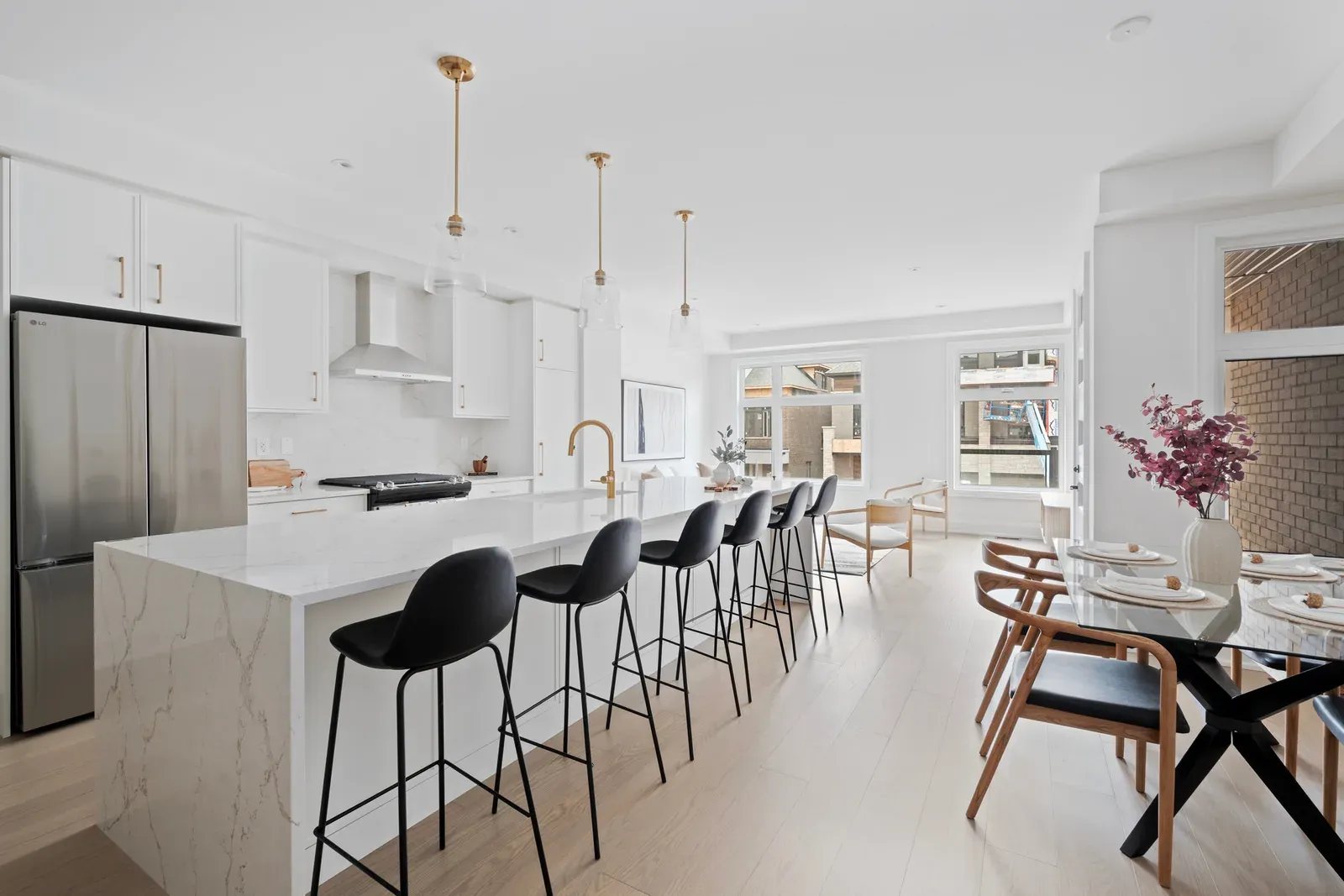
Virtual home staging digitally adds furniture, rugs, artwork, plants, and decorative elements to photographs of residential rooms. It changes the marketing image rather than the physical property, so digitally added items will not appear during a viewing. The process begins with accurate photography, followed by image correction, style selection, proportional furniture placement, detailed review, and clear disclosure.
Virtual staging may help viewers interpret an empty or sparsely furnished room, but its usefulness depends on image quality, property condition, realistic editing, responsible labelling, and the needs of the intended audience.
What Does Virtual Home Staging Mean?
Virtual staging creates an illustrative furnished version of a real property photograph. It primarily shows how movable household items might fit inside an existing room while preserving the room’s architecture, dimensions, permanent finishes, and actual condition.
Changing the Image, Not the Property
Unlike physical staging, virtual staging does not place real furniture inside the residence. An editor or automated system adds digital objects to a photograph after the camera captures the room.
The edited result may show a sofa, bed, dining table, rug, lamps, artwork, plants, or other movable accessories. However, these objects exist only in the image. Buyers should not assume that digitally shown furniture forms part of the property or will remain after a transaction.
This distinction affects the viewing experience. An online image may demonstrate one possible arrangement, while visitors will encounter the original vacant, sparsely furnished, or differently furnished room.
Why Vacant Rooms Commonly Receive Digital Furniture
Empty rooms can look clean and open, yet some viewers find their dimensions difficult to assess. Without familiar objects, a photograph may not indicate whether a bedroom accommodates a standard bed or whether a living room supports several seats.
Digital furniture can provide a visual reference and assign a clear function to the space. For example, an empty room may appear as a bedroom, study, or sitting room. Nevertheless, the chosen use must remain credible given the room’s size, access, ventilation, safety features, and lawful status.
How It Differs from Basic Photo Correction
Basic correction adjusts exposure, white balance, contrast, perspective, and similar photographic qualities. These changes aim to represent the existing property more accurately rather than add imagined contents.
Virtual staging introduces objects that were not present during photography. Therefore, it changes the scene’s contents, even when the underlying room remains accurate. Both processes require restraint because extreme brightness, altered colours, or distorted dimensions can misrepresent the residence.
How It Differs from Architectural Rendering
An architectural rendering may depict a property before construction or show a proposed design based on plans. In contrast, virtual staging usually begins with a photograph of an existing room and adds movable furnishings.
Renovation visualisation occupies another category. It may replace flooring, cabinets, countertops, walls, windows, or permanent fixtures digitally. Such changes extend beyond ordinary staging and require especially clear identification as proposed, hypothetical, or illustrative.
How Does the Virtual-Staging Process Work?
A responsible workflow moves from property assessment to photography, digital editing, accuracy review, disclosure, and publication. Each stage affects whether the final image appears realistic and represents the property fairly.
Selecting Appropriate Rooms
The first step involves identifying rooms that may benefit from digital furnishing. Vacant living rooms, bedrooms, dining areas, flexible spaces, and unusually shaped rooms often need more visual context than corridors, utility spaces, or straightforward bathrooms.
Not every image requires staging. Adding decoration to every room can increase inconsistency and distract from permanent features. Selection should consider:
- Whether the room’s function appears unclear
- Whether furniture would provide useful scale
- Whether the photograph has sufficient quality
- Whether important features remain fully visible
- Whether the proposed layout looks physically possible
- Whether an original image will accompany the staged version
The decision should respond to an actual communication need rather than a preference for decoration.
Preparing the Physical Room
Virtual editing does not eliminate the need to prepare the property. Dust, debris, tangled cables, damaged blinds, uneven lighting, and crowded temporary storage will limit the usefulness of the source photograph.
Before photography, clean visible surfaces and remove movable clutter where appropriate. Open doors and window coverings only when doing so improves the view without compromising privacy or safety. Permanent fixtures, vents, outlets, radiators, controls, windows, and architectural details should remain visible.
If serious damage or unresolved defects appear, digital furnishings must not cover them. Physical maintenance and truthful representation take priority over image styling.
Capturing a Clear Source Photograph
The photographer records a high-resolution image from an angle that shows the room’s layout accurately. A useful camera position reveals floor area, wall relationships, windows, doors, and fixed features without exaggerating width or depth.
The room should receive balanced natural and artificial light. However, extreme exposure can erase window views or make dark corners appear unrealistically bright. Straight vertical lines and controlled lens distortion also matter because digital furniture must follow the photograph’s perspective.
A poor source image can produce an artificial result even when the added objects look polished. Blurred edges, strong distortion, inaccurate colour, or incomplete room details make realistic placement more difficult.
Correcting the Base Image
After photography, basic correction may improve exposure, colour balance, perspective, and visual consistency. This stage should clarify the existing scene without transforming permanent property characteristics.
Reasonable correction may straighten vertical lines, balance light, or remove temporary camera-related distractions. However, it should not enlarge windows, raise ceilings, change room dimensions, replace views, or erase material defects.
Editors should retain the original file. Comparing it with the corrected image helps identify accidental changes before digital furnishings enter the scene.
Choosing a Function and Style
The next step defines the intended use of the room and selects a suitable decorative direction. The function should match the room’s physical characteristics rather than force an appealing but implausible idea.
Style choices may draw from contemporary, traditional, minimalist, transitional, family-oriented, urban, or luxury aesthetics. However, the selection should relate to the property’s architecture, size, finishes, likely occupancy, price position, and neighbourhood context.
A restrained design often communicates the layout more clearly than elaborate decoration. Excess accessories can obscure outlets, baseboards, doors, or floor area and can make the image appear generated rather than credible.
Estimating Proportions and Perspective
Accurate scale forms the foundation of realistic virtual staging. Editors may use known room dimensions, floor plans, door heights, window sizes, cabinetry, or other fixed references to estimate suitable furniture proportions.
Every digital object must follow the room’s perspective. A sofa near the camera should appear larger than a chair farther away, while table legs must meet the floor plane convincingly. Incorrect scale can suggest that a room accommodates furniture that would not fit physically.
Measurements provide stronger evidence than visual estimation alone. When dimensions remain uncertain, conservative furniture choices reduce the risk of exaggerating capacity.
Removing Temporary Movable Items
Some virtual-staging processes remove existing movable furnishings, boxes, cords, or decorative objects before adding a new arrangement. This technique can help when outdated or mismatched contents dominate an otherwise suitable room.
Removal requires careful boundaries. An editor may reasonably remove a freestanding chair or temporary carton, but removing a radiator, damaged flooring, built-in cabinet, outlet, or fixed light alters the property itself.
Where occupied photographs receive substantial digital clearing, the listing should explain the nature of the image. Providing the original photograph also helps viewers distinguish actual conditions from the illustrative presentation.
Adding Furniture and Decorative Elements
The editor places digital furniture, rugs, artwork, lamps, plants, and accessories within the corrected photograph. Each object needs appropriate size, angle, colour, texture, and relationship to surrounding surfaces.
Placement should preserve plausible walking routes and operational access. Furniture must not block doors, windows, vents, heating equipment, electrical panels, or safety devices. Similarly, a dining arrangement should leave credible space for chair movement rather than fill every visible part of the floor.
Accessories should support the room’s purpose. A limited selection often produces a more convincing residential image than abundant decoration.
Matching Shadows, Reflections, and Light
Digitally added objects need shadows that correspond with the room’s light direction and strength. Without convincing contact shadows, furniture may appear to float above the floor.
Reflective floors, windows, mirrors, glass tables, and polished cabinetry create additional complexity. Digital objects may require subtle reflections, yet these reflections must match the original surface. Likewise, transparent materials should reveal the correct background.
Colour temperature also affects realism. Furniture illuminated by warm digital light will look inconsistent within a cool daylight photograph unless the editor balances the scene carefully.
Reviewing the Staged Image
A detailed review checks realism, accuracy, safety, and consistency. The staged version should sit beside the original photograph during this assessment.
Reviewers should examine whether:
- Furniture proportions match the room
- Perspective follows the floor and walls
- Shadows connect objects to surfaces
- Reflections remain physically plausible
- Windows and permanent views remain unchanged
- Doors and walkways remain usable
- Fixed equipment remains visible
- Added objects look coherent at full size
- Architecture and dimensions remain identical
- The room’s function appears credible
Viewing the image on both a large screen and a mobile device can reveal different errors.
Adding Disclosure and Publishing Both Versions
Every virtually staged image should carry clear wording that identifies the digital alteration. Disclosure may appear directly on the image, in the caption, or in another prominent listing location, depending on applicable requirements.
Small, vague, or distant wording may fail to prevent confusion. Where practical, the listing should present the original unstaged photograph beside or near the edited version. Buyers can then compare actual conditions with the suggested layout.
Agents and sellers should verify current advertising, brokerage, platform, and local requirements before publication. These requirements can vary by location and listing channel.
What Makes Source Photography Suitable?
Virtual staging cannot fully compensate for weak photography. Accurate source images make it easier to produce believable furniture, preserve permanent features, and maintain consistency across the listing.
Camera Position and Perspective
The camera should sit at a height and angle that presents the room naturally. Extremely high, low, or wide viewpoints can distort wall relationships and make furniture placement difficult.
Vertical architectural lines should appear straight unless the building itself creates an angle. Moreover, the photograph should show enough floor and wall area to establish the room’s geometry. Cropping essential openings or fixed features may produce an incomplete representation.
A consistent camera position across connected rooms also helps viewers follow the floor plan. Sudden changes in perspective can make the listing feel visually disjointed.
Resolution and Image Clarity
High-resolution photographs provide clean edges around baseboards, windows, doors, fixtures, and flooring. Digital additions can then integrate more convincingly with the original scene.
Low-resolution images often produce blurred boundaries and visible artefacts after editing. Compression may also remove subtle shadow and texture information. Enlarging a small file does not restore genuine detail, so capturing adequate resolution from the beginning remains important.
The final image should receive inspection at its intended publication size. Fine errors may disappear on a telephone screen but remain obvious on a larger display.
Natural and Artificial Lighting
Balanced lighting reveals the room without flattening surfaces or hiding corners. Natural daylight often provides useful depth, while existing lamps may support darker areas.
However, windows should not appear as featureless white rectangles. Similarly, harsh overhead lighting can create deep shadows that conflict with digitally added furniture. Consistent illumination makes it easier to match new objects with the room.
Photographs taken at different times should maintain reasonable colour continuity. One strongly yellow room beside another with blue daylight can weaken the full listing.
Room Preparation and Clean Surfaces
An orderly room provides a cleaner base for virtual additions. Remove rubbish, cleaning equipment, unnecessary cords, temporary storage, and personal information before the camera arrives.
Clean floors and reflective surfaces because digital furniture will not conceal every mark. Open sightlines also help the editor identify the floor plane and wall boundaries. Nevertheless, do not remove fixtures or property features merely to create a simpler composition.
Privacy deserves special attention. Photographs should not reveal identification, financial documents, family schedules, medications, security details, or images of residents without appropriate permission.
How Do Manual and AI-Assisted Methods Differ?
Virtual staging may involve detailed manual composition, automated generation, or a combination of both. The method matters less than whether the finished image remains accurate, realistic, reviewed, and properly disclosed.
Manual Object Placement
Manual staging allows an editor to select individual digital objects and adjust their position, scale, perspective, colour, lighting, and shadows. This controlled approach can preserve architectural details carefully.
However, manual work still produces errors if measurements, source photography, or judgment remain weak. A polished sofa does not become accurate merely because someone placed it individually. The editor must compare every addition with the original property and confirm that the proposed arrangement could exist physically.
Automated Image Generation
Automated systems can create furnished concepts quickly from an empty-room image. They may provide several styles or layouts without placing every object separately.
Speed does not guarantee accuracy. Automated output may invent doors, modify window frames, bend walls, duplicate fixtures, distort flooring, or create furniture with impossible geometry. It may also overlook outlets, vents, radiators, and other details that matter to buyers.
Consequently, automated generation requires close inspection rather than immediate publication.
Why Human Review Remains Necessary
A person should compare the original and edited images at full resolution. This review checks permanent features, dimensions, shadows, reflections, object scale, and disclosure.
Generative systems sometimes make subtle changes that appear plausible at first glance. A window may become wider, a ceiling line may shift, or a damaged surface may disappear. Human review can identify these discrepancies and reject or correct the image.
Technology can assist production, but it does not transfer responsibility for accurate marketing away from the people publishing the listing.
Which Visual Styles Can Virtual Staging Show?
Digital staging can depict many decorative directions, but style should clarify the room rather than overwhelm it. Architecture, scale, fixed finishes, and likely use should influence the selection.
Contemporary and Minimalist Arrangements
Contemporary styling may use clean lines, restrained colours, and limited accessories. Minimalist arrangements reduce visual information further and can suit compact rooms where excess digital furniture would obscure floor area.
However, minimalism should not leave the image feeling unfinished. A credible seating arrangement, appropriate rug, and limited artwork may provide sufficient context. The design should also avoid furniture that looks too small merely to make the room appear larger.
Traditional and Transitional Interiors
Traditional styling may include warmer timber tones, shaped furniture, layered textiles, and familiar decorative forms. Transitional design combines such elements with simpler contemporary lines.
These styles can suit older houses or interiors with classic architectural details. Nevertheless, heavy digital furnishings may dominate a modest room. Proportion, colour, and spacing should reflect the actual architecture instead of imposing an unrelated visual identity.
Family-Oriented and Multifunctional Layouts
A family-oriented layout may show durable seating, practical dining arrangements, or controlled toy storage. A multifunctional room might combine living and working functions or show a compact study corner.
Such designs should avoid unsupported assumptions about prospective occupants. Their purpose is to illustrate feasible use, not to define who belongs in the home. Accessibility, circulation, storage, and safety should remain visible and plausible.
Neutral and Luxury Presentation
Neutral staging may use broadly compatible colours and simple furniture to keep attention on the property. Luxury styling may add richer materials, larger artwork, and refined decorative detail.
An excessively luxurious design can create expectations that the physical property cannot support. Digital furnishings should align reasonably with room dimensions, permanent finishes, price position, and architectural character. Decorative ambition must not override credibility.
When May Virtual Staging Suit a Property?
Virtual staging may suit properties where digital furniture solves a clear visual communication problem. Its value depends on the source images, marketing approach, buyer needs, and physical viewing conditions.
Vacant Condominiums and Houses
Empty homes offer a clean base for digital furniture. Staging may help viewers judge where a sofa, dining table, or bed could fit without transporting physical items.
Vacant condominiums often contain compact or open-plan rooms that benefit from clear zoning. Detached houses may contain several empty spaces with similar finishes, so different digital functions can help distinguish them. However, viewers should still receive accurate dimensions and original photographs.
New Developments and Renovated Homes
Completed but unfurnished properties may benefit from illustrative layouts. Digital furniture can soften bare surfaces and demonstrate possible use while leaving new finishes visible.
Staging should not portray unfinished work as complete unless the image carries unmistakable labelling as a proposed visualisation. Similarly, digital edits must not repair construction defects, replace unfinished surfaces, or add fixtures that the property lacks.
Unusual or Multipurpose Rooms
An angled room, basement area, open landing, or narrow den may confuse viewers when empty. Virtual furniture can demonstrate one plausible arrangement.
The proposed function must respect building conditions and legal status. A windowless storage area should not appear as a conventional bedroom if its characteristics do not support that representation. Floor plans, measurements, and accurate descriptions remain important.
Occupied Properties with Outdated Movable Furnishings
Editors can sometimes remove movable furniture digitally and replace it with a more coherent arrangement. This approach may reduce physical disruption where residents continue living in the property.
However, heavy clutter, complex shadows, and overlapping objects make removal difficult. The resulting image may contain distorted floors or reconstructed walls. Photography of an orderly room usually provides a stronger source than extensive digital clearing.
Canadian Housing and Seasonal Conditions
Canadian listings include condominiums, townhouses, detached homes, basement suites, historic properties, and new developments. Seasonal daylight, winter vacancies, remote searches, and diverse layouts may influence whether digital furnishings offer useful context.
For home staging in Toronto, compact urban units, neighbouring high-rises, limited winter light, and vacant properties during colder months may shape image preparation. Regardless of location, publishers should verify current local disclosure, brokerage, advertising, and listing-platform requirements before using altered photographs.
What Possible Benefits Can Virtual Staging Offer?
Virtual staging may support visual communication without moving real furniture into the property. These possible advantages depend on execution quality and do not establish a particular marketing or sales result.
Showing Function and Furniture Scale
A digitally furnished room can demonstrate one plausible use and give viewers familiar scale references. This may help when an empty room lacks obvious context.
However, the furniture must match actual dimensions. An undersized digital bed or narrow sofa can overstate capacity. Room measurements and floor plans should support the image rather than leaving buyers to rely solely on decorative presentation.
Reducing Physical Logistics
Virtual staging avoids furniture delivery, installation, storage, maintenance, and removal inside the property. This characteristic may suit vacant listings with limited access or short preparation periods.
The method also reduces physical disturbance to floors, walls, elevators, and occupied buildings. Nevertheless, it introduces its own tasks, including suitable photography, editing, quality control, file management, disclosure, and consistency checks.
Providing Visual Variations
A digital image can show alternative styles or room functions without physically rearranging furniture. For example, one flexible room might appear as a study in one labelled image and a sitting area in another.
Too many versions may confuse viewers. Each variation should carry clear identification and remain physically plausible. The listing should not imply that all depicted arrangements or furnishings exist simultaneously.
Supporting Remote Property Searches
Remote viewers may rely heavily on photographs, floor plans, descriptions, and virtual tours before deciding whether to visit. Staged images can offer layout ideas when physical access remains difficult.
However, remote buyers may also face a greater risk of misinterpreting digital content. Clear labels, original photographs, accurate dimensions, and direct answers about permanent features support better-informed assessment.
What Limitations and Risks Require Attention?
Virtual staging can mislead viewers when digital appeal takes priority over property accuracy. Errors may arise from poor source images, weak editing, automation, unclear instructions, or inadequate review.
Incorrect Scale and Perspective
Furniture that appears too small can exaggerate room size, while oversized objects can make adequate spaces look cramped. Incorrect perspective may cause tables, rugs, or beds to sit at impossible angles.
Common warning signs include floating legs, sloping furniture, mismatched vanishing points, and objects that intersect walls. These faults reduce visual credibility and may create inaccurate expectations about what fits inside the room.
Unrealistic Shadows and Textures
Objects need contact shadows and lighting that match the source photograph. Missing or inconsistent shadows make furniture appear detached from the room.
Texture quality also matters. Repeated patterns, blurred upholstery, warped artwork, and unnatural plant leaves often indicate weak editing. Highly polished surfaces can reveal further errors when expected reflections remain absent or point in the wrong direction.
Altered Permanent Features
Virtual staging should preserve walls, ceilings, flooring, windows, doors, cabinets, outlets, radiators, views, and built-in fixtures. Removing or changing these elements may misrepresent present conditions.
An automated system might alter a window unintentionally while generating curtains or replace part of a floor beneath a rug. Reviewers should compare every boundary with the original image rather than focusing only on the attractiveness of the added furniture.
Concealed Damage or Obstructions
Digital objects must not cover stains, cracks, moisture, damaged flooring, missing fixtures, or other relevant conditions. Similarly, furniture should not block access to doors, vents, panels, safety devices, or essential equipment.
Visual staging cannot replace repair, inspection, disclosure, or accurate property information. If an editor removes temporary clutter, reviewers should confirm that no permanent concern disappeared during the process.
Buyer Disappointment
A carefully furnished image may create an atmosphere that the vacant physical room does not reproduce. Buyers arriving for a viewing could feel confused if the listing fails to identify the virtual presentation clearly.
Providing original images helps align expectations. Moreover, room measurements and floor plans give viewers objective context beyond furniture. Digital styling should operate as an illustration rather than a substitute for the property itself.
Privacy and Intellectual-Property Concerns
Source photographs can contain family images, documents, security information, licence plates, or identifiable residents. These details require removal or protection before publication, regardless of whether virtual staging occurs.
Digital furniture, artwork, and design assets may also carry usage conditions or ownership considerations. Publishers should confirm that they have appropriate rights to the photographs and added elements. Generative technology does not eliminate responsibility for lawful use.
How Does Virtual Staging Compare with Physical Staging?
Both methods can clarify room use, yet they affect different parts of the buyer experience. Neither option suits every property, budget, or marketing strategy.
Physical Staging Changes the Residence
Physical staging places real furniture and decoration inside the property. Buyers see and move around those items during viewings, while photographers capture the actual arrangement.
It may provide sensory context and consistent online and physical presentation. However, it involves transportation, installation, storage, access, upkeep, potential damage, and removal. Furniture may also obstruct compact rooms if selection or placement proves unsuitable.
Virtual Staging Changes Marketing Images
Virtual staging leaves the property physically unchanged. It offers flexibility and avoids furniture installation, but visitors may encounter empty or differently furnished rooms.
Its principal characteristics include:
- Digital rather than physical furniture
- Greater flexibility for visual variations
- Dependence on strong source photography
- No improvement to the physical viewing atmosphere
- A continuing need for accurate dimensions
- Clear disclosure of altered images
- Careful review for generated errors
- Preservation of permanent property features
The appropriate choice depends on property condition, occupancy, access, budget, timing, and intended marketing.
How Does Staging Differ from Renovation Visualisation?
Ordinary virtual staging adds movable contents. Once an image changes permanent finishes, structure, fixtures, or views, it moves into renovation or design visualisation and needs different labelling.
Movable Additions Usually Fit Staging
Sofas, beds, tables, chairs, rugs, freestanding lamps, plants, and artwork generally represent movable staging elements. They illustrate one possible use without claiming that the property currently contains them.
Even these additions require disclosure because they do not exist in the photographed room. Editors must also ensure that their placement remains possible and does not cover significant property details.
Permanent Changes Require Stronger Identification
Digitally replacing flooring, repainting walls, changing cabinets, adding countertops, removing walls, enlarging windows, or altering exterior views shows a hypothetical condition.
Such images should never appear as evidence of the property’s present state. Clear wording should identify them as proposed renovation concepts or illustrative possibilities. Where relevant, viewers should also receive an accurate photograph of the current condition.
Why Does Disclosure Matter?
Disclosure allows viewers to separate the physical property from a digitally created furnishing concept. Clear labelling supports informed decisions and strengthens the credibility of the listing.
Make Labels Prominent and Specific
A label such as “virtually staged” should appear where viewers can associate it directly with the altered image. Obscure wording buried elsewhere may not prevent confusion.
If an image also changes permanent features for conceptual purposes, the label should explain that broader alteration. Generic staging wording may not adequately describe a hypothetical renovation. The degree of disclosure should match the degree of editing.
Provide Original Photographs Where Practical
Presenting staged and original versions allows buyers to compare the suggested arrangement with the actual room. Consistent camera angles make that comparison easier.
Original images also help reviewers confirm that walls, windows, flooring, fixtures, and views remain unchanged. If the listing platform limits image placement, captions and ordering should still distinguish edited content clearly.
Verify Applicable Requirements
Advertising, brokerage, listing-platform, and local requirements may differ. Agents, sellers, landlords, and other publishers should verify the current rules that apply to their property and marketing channel.
Disclosure supports ethical communication, but it does not excuse inaccurate editing. A label cannot make a misleading room dimension or concealed defect acceptable. Accuracy must shape the image itself.
How Can Image Quality Be Evaluated?
Quality review should consider both visual realism and factual accuracy. An attractive image fails its purpose if it changes the property or suggests an impossible layout.
Use a Structured Review Checklist
Inspect each image at full size and on a mobile screen. Confirm the following:
- Furniture matches credible room proportions
- Placement follows the correct perspective
- Objects touch floors and walls naturally
- Shadows follow existing light
- Reflections match surrounding surfaces
- Windows and exterior views remain unchanged
- Doors, vents, outlets, and fixtures remain visible
- Walkways appear usable
- Architecture and dimensions match the original
- Styling suits the property
- Images remain consistent with one another
- Disclosure appears clearly
- The original photograph remains available
Correct any discrepancy before publication.
Recognize Common Editing Clues
Poor editing often produces warped furniture, repeated textures, floating objects, impossible shadows, distorted floorboards, blurry boundaries, or decorations fused with walls.
Automated images may also invent handles, duplicate windows, change ceiling lines, or create furniture with missing parts. Small screens can hide these faults, so full-resolution inspection remains necessary. Comparing the image directly with the original provides the strongest accuracy check.
How Should Listings Use Virtual Staging Responsibly?
Responsible use starts with selective editing and continues through disclosure, publication, monitoring, and removal. Accuracy should remain the governing principle at every stage.
Stage Only Rooms That Benefit
Select rooms where digital furniture clarifies function or scale. Leave straightforward spaces unstaged when added decoration would offer little information.
Maintain a consistent design across connected rooms, but avoid excessive detail. Digital books, food, electronics, toys, or personal accessories can create unnecessary visual noise. The property should remain the principal subject.
Review Every Publication Format
Check how the disclosure and image appear in galleries, thumbnails, mobile displays, printed materials, and shared links. Cropping may remove a label that appears clearly in the original file.
Also confirm that captions remain attached to the correct images. If a platform rearranges photographs, staged and original versions may become separated. A final listing review can identify these presentation problems.
Correct and Retire Inaccurate Images
If an error appears after publication, replace or remove the affected image promptly. Outdated photographs should also leave the listing when physical conditions change materially.
Keep organized records of original files, staged versions, approvals, and publication dates. This documentation helps maintain consistency and supports later review without making any claim about legal compliance.
How Can Buyers Assess Virtually Staged Listings?
Buyers can treat staged images as layout illustrations while relying on original photographs, dimensions, floor plans, and physical inspection for property assessment.
Compare Evidence Across the Listing
Look for disclosure labels and compare each staged image with its original counterpart. Check whether windows, doors, flooring, walls, cabinets, fixtures, and views remain identical.
Floor plans and room measurements provide additional context. Digital furniture can indicate possible use, but it does not prove that every object fits at the scale shown. Buyers should also confirm which physical fixtures and movable items remain with the property.
Separate Inspiration from Existing Condition
A digitally furnished room may suggest a decorative idea, not the residence’s actual appearance. Colour, lighting, and accessories can shape perception even when the architecture remains unchanged.
Where possible, view the property physically or request current unaltered imagery. Ask whether the editing changed permanent features or removed existing contents. These steps preserve buyer autonomy without assuming that every staged image contains a problem.
Conclusion
Virtual home staging adds digital furniture and decoration to real property photographs while leaving the physical residence unchanged. The process relies on accurate photography, credible proportions, careful object placement, realistic lighting, detailed comparison, and clear disclosure. It may help viewers interpret vacant or ambiguous rooms, but poor execution can distort scale, conceal conditions, or create unrealistic expectations. Responsible use preserves architecture, permanent finishes, defects, views, and access while presenting original images where practical. Accuracy and transparent labelling must always take priority over visual appeal.
FAQs
Virtual home staging means adding digitally created furniture, artwork, rugs, plants, and accessories to a photograph of a real residential room. The edits illustrate a possible layout but do not alter the physical property. Therefore, viewers should expect the added items to be absent during an in-person viewing.
How does virtual home staging work?
Virtual staging begins with clear property photography, followed by basic image correction, style selection, proportional object placement, and detailed accuracy review. Editors match perspective, lighting, shadows, and reflections before adding disclosure. The original and edited photographs should then appear in a way that allows viewers to distinguish them.
Is virtual staging the same as photo editing?
Virtual staging is a form of photo editing, but it specifically adds or changes movable furnishings and decoration. Basic correction usually adjusts exposure, colour, contrast, or perspective without changing scene contents. Altering walls, flooring, windows, cabinets, or views goes beyond ordinary staging and requires clearer conceptual labelling.
Does virtual staging require an empty property?
No, virtual staging does not require an empty property. Editors may work with vacant, sparsely furnished, or orderly occupied rooms. However, extensive clutter and overlapping furniture make removal difficult and can produce visible artefacts. Preparing the physical room before photography generally creates a cleaner, more accurate base image.
How can buyers identify virtually staged photographs?
Buyers can identify virtually staged photographs by checking image labels, captions, listing remarks, and comparisons with original room photographs. Visual clues may include unusually perfect furnishings, inconsistent shadows, repeated textures, or objects with distorted edges. Floor plans and physical viewings provide further context for judging actual dimensions and condition.
Should listings disclose virtual staging?
Yes, listings should disclose virtual staging clearly so viewers can distinguish actual property conditions from illustrative furnishings. The wording should appear prominently and remain associated with the edited image. Publishers should also verify current platform, brokerage, advertising, and local requirements because disclosure expectations may vary across locations and channels.
Can virtual staging remove existing furniture?
Yes, digital editing can remove movable furniture before adding a different arrangement, although complex removals may distort floors, walls, or shadows. Editors should not remove built-ins, fixtures, damage, or permanent property features. Providing the original photograph helps viewers see what physically occupied the room when the camera captured it.
What makes a virtually staged image look realistic?
Correct scale, perspective, contact shadows, reflections, colour, texture, and lighting make a virtually staged image look realistic. Furniture should follow the room’s geometry and preserve usable routes. Editors should also retain windows, outlets, vents, radiators, flooring patterns, architectural lines, and every other permanent feature shown originally.
What should virtual staging never change?
Virtual staging should never change room dimensions, architecture, exterior views, fixed fixtures, permanent finishes, or visible material defects while presenting the result as current reality. Proposed renovations require unmistakable labelling. Digital furniture must also avoid covering safety equipment, access points, vents, doors, windows, outlets, or relevant damage.
Is physical staging better than virtual staging?
Neither method is universally better because each supports different property and marketing needs. Physical staging changes the viewing environment but requires furniture, access, installation, and removal. Virtual staging offers visual flexibility without physical furnishings, although it affects images only and requires careful accuracy checks, disclosure, and realistic buyer expectations.